IPAM : IP 할당과 관리
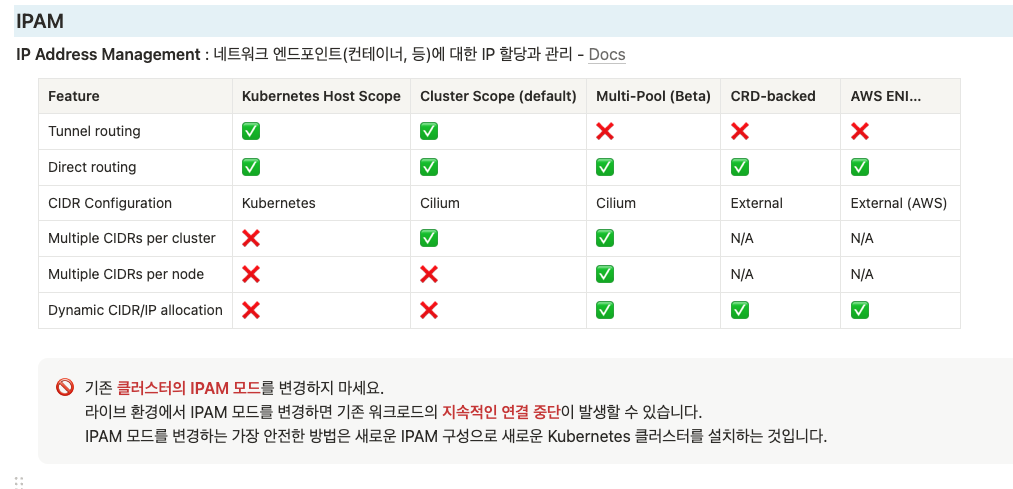
실습환경 소개
🎯 실습 환경 소개

mkdir cilium-lab && cd cilium-lab

curl -O https://raw.githubusercontent.com/gasida/vagrant-lab/refs/heads/main/cilium-study/3w/Vagrantfile

vagrant up
route-add1.sh : k8s node 들이 사내망(?)과 통신을 위한 route 설정
#!/usr/bin/env bash

echo ">>>> Route Add Config Start <<<<"

chmod 600 /etc/netplan/01-netcfg.yaml
chmod 600 /etc/netplan/50-vagrant.yaml

cat <<EOT>> /etc/netplan/50-vagrant.yaml
      routes:
      - to: 10.10.0.0/16
        via: 192.168.10.200
EOT

netplan apply

echo ">>>> Route Add Config End <<<<"
router.sh - router 역할의 (웹) 서버
#!/usr/bin/env bash

echo ">>>> Initial Config Start <<<<"

echo "[TASK 1] Setting Profile & Bashrc"
echo 'alias vi=vim' >> /etc/profile
echo "sudo su -" >> /home/vagrant/.bashrc
ln -sf /usr/share/zoneinfo/Asia/Seoul /etc/localtime

echo "[TASK 2] Disable AppArmor"
systemctl stop ufw && systemctl disable ufw >/dev/null 2>&1
systemctl stop apparmor && systemctl disable apparmor >/dev/null 2>&1

echo "[TASK 3] Add Kernel setting - IP Forwarding"
sed -i 's/#net.ipv4.ip_forward=1/net.ipv4.ip_forward=1/g' /etc/sysctl.conf
sysctl -p >/dev/null 2>&1

echo "[TASK 4] Setting Dummy Interface"
modprobe dummy
ip link add loop1 type dummy
ip link set loop1 up
ip addr add 10.10.1.200/24 dev loop1

ip link add loop2 type dummy
ip link set loop2 up
ip addr add 10.10.2.200/24 dev loop2

echo "[TASK 5] Install Packages"
export DEBIAN_FRONTEND=noninteractive
apt update -qq >/dev/null 2>&1
apt-get install net-tools jq tree ngrep tcpdump arping -y -qq >/dev/null 2>&1

echo "[TASK 6] Install Apache"
apt install apache2 -y >/dev/null 2>&1
echo -e "<h1>Web Server : $(hostname)</h1>" > /var/www/html/index.html

echo ">>>> Initial Config End <<<<"
Kubernetes Host Scope
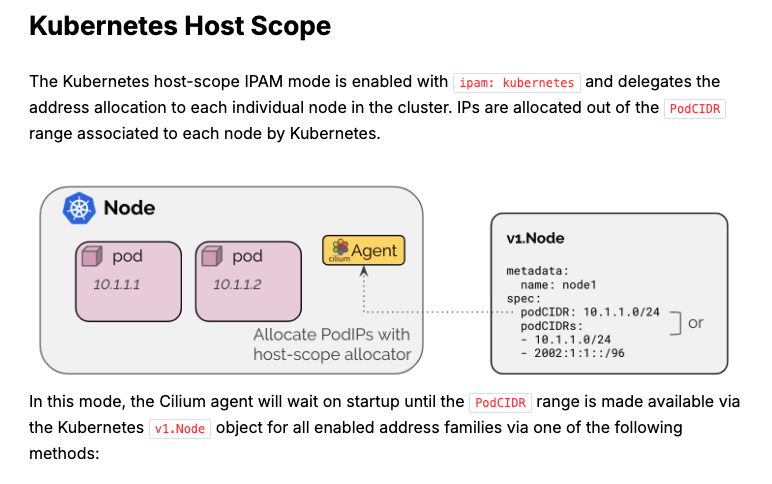
✅ Kubernetes Host Scope IPAM 모드 요약
- 모드 이름: ipam: kubernetes
- 역할: 각 노드가 자신의 PodCIDR 범위 내에서 IP를 직접 할당함
- 작동 방식:
- Kubernetes가 각 노드에 지정한 PodCIDR 범위를 사용
- Cilium 에이전트는 Kubernetes의 Node 객체(v1.Node) 에서 PodCIDR 정보가 준비될 때까지 대기함
이 모드는 Cilium이 IP 할당을 직접 처리하지 않고, Kubernetes가 지정한 노드별 범위를 사용한다는 게 핵심이에요.
# 클러스터 정보 확인
kubectl cluster-info dump | grep -m 2 -E "cluster-cidr|service-cluster-ip-range"
                            "--service-cluster-ip-range=10.96.0.0/16",
                            "--cluster-cidr=10.244.0.0/16",

# ipam 모드 확인
cilium config view | grep ^ipam
ipam                                              kubernetes

# 노드별 파드에 할당되는 IPAM(PodCIDR) 정보 확인
# --allocate-node-cidrs=true 로 설정된 kube-controller-manager에서 CIDR을 자동 할당함
kubectl get nodes -o jsonpath='{range .items[*]}{.metadata.name}{"\t"}{.spec.podCIDR}{"\n"}{end}'
k8s-ctr 10.244.0.0/24
k8s-w1  10.244.1.0/24

kc describe pod -n kube-system kube-controller-manager-k8s-ctr
...
    Command:
      kube-controller-manager
      --allocate-node-cidrs=true
      --cluster-cidr=10.244.0.0/16
      --service-cluster-ip-range=10.96.0.0/16
...

kubectl get ciliumnode -o json | grep podCIDRs -A2

# 파드 정보 : 상태, 파드 IP 확인
kubectl get ciliumendpoints.cilium.io -A
샘플 애플리케이션 배포 및 확인 & Termshark
# 샘플 애플리케이션 배포
cat << EOF | kubectl apply -f -
apiVersion: apps/v1
kind: Deployment
metadata:
  name: webpod
spec:
  replicas: 2
  selector:
    matchLabels:
      app: webpod
  template:
    metadata:
      labels:
        app: webpod
    spec:
      affinity:
        podAntiAffinity:
          requiredDuringSchedulingIgnoredDuringExecution:
          - labelSelector:
              matchExpressions:
              - key: app
                operator: In
                values:
                - sample-app
            topologyKey: "kubernetes.io/hostname"
      containers:
      - name: webpod
        image: traefik/whoami
        ports:
        - containerPort: 80
---
apiVersion: v1
kind: Service
metadata:
  name: webpod
  labels:
    app: webpod
spec:
  selector:
    app: webpod
  ports:
  - protocol: TCP
    port: 80
    targetPort: 80
  type: ClusterIP
EOF


# k8s-ctr 노드에 curl-pod 파드 배포
cat <<EOF | kubectl apply -f -
apiVersion: v1
kind: Pod
metadata:
  name: curl-pod
  labels:
    app: curl
spec:
  nodeName: k8s-ctr
  containers:
  - name: curl
    image: nicolaka/netshoot
    command: ["tail"]
    args: ["-f", "/dev/null"]
  terminationGracePeriodSeconds: 0
EOF
# 배포 확인
kubectl get deploy,svc,ep webpod -owide
kubectl get endpointslices -l app=webpod
kubectl get ciliumendpoints # IP 확인
kubectl exec -it -n kube-system ds/cilium -c cilium-agent -- cilium-dbg endpoint list
# 통신 확인
kubectl exec -it curl-pod -- curl webpod | grep Hostname
kubectl exec -it curl-pod -- sh -c 'while true; do curl -s webpod | grep Hostname; sleep 1; done'- hubble observe로 NAT svc ip로 변경되는것 확인
- tcpdump 했을때는 pod ip로 Native Routing 되는것 확인
# hubble ui 웹 접속 주소 확인 : default 네임스페이스 확인
NODEIP=$(ip -4 addr show eth1 | grep -oP '(?<=inet\s)\d+(\.\d+){3}')
echo -e "http://$NODEIP:30003"

# hubble relay 포트 포워딩 실행
cilium hubble port-forward&
hubble status


# flow log 모니터링
hubble observe -f --protocol tcp --to-pod curl-pod
hubble observe -f --protocol tcp --from-pod curl-pod
hubble observe -f --protocol tcp --pod curl-pod
l 26 08:15:33.840: default/curl-pod (ID:37934) <> 10.96.88.194:80 (world) pre-xlate-fwd TRACED (TCP)
Jul 26 08:15:33.840: default/curl-pod (ID:37934) <> default/webpod-697b545f57-2h59t:80 (ID:23913) post-xlate-fwd TRANSLATED (TCP)
Jul 26 08:15:33.840: default/curl-pod:53092 (ID:37934) -> default/webpod-697b545f57-2h59t:80 (ID:23913) to-network FORWARDED (TCP Flags: SYN)
Jul 26 08:15:33.841: default/curl-pod:53092 (ID:37934) <- default/webpod-697b545f57-2h59t:80 (ID:23913) to-endpoint FORWARDED (TCP Flags: SYN, ACK)
pre-xlate-fwd , TRACED : NAT (IP 변환) 전 , 추적 중인 flow
post-xlate-fwd , TRANSLATED : NAT 후의 흐름 , NAT 변환이 일어났음

# 호출 시도
kubectl exec -it curl-pod -- curl webpod | grep Hostname
kubectl exec -it curl-pod -- curl webpod | grep Hostname
혹은
kubectl exec -it curl-pod -- sh -c 'while true; do curl -s webpod | grep Hostname; sleep 1; done'


# tcpdump 확인 : 파드 IP 확인
tcpdump -i eth1 tcp port 80 -nn
17:23:25.920613 IP 10.244.0.144.39112 > 10.244.1.180.80: Flags [P.], seq 1:71, ack 1, win 502, options [nop,nop,TS val 3745105977 ecr 1971332111], length 70: HTTP: GET / HTTP/1.1

#
tcpdump -i eth1 tcp port 80 -w /tmp/http.pcap

#
termshark -r /tmp/http.pcap- 와이어 샤크 같은거 터미널 샤크 사용

실습 1 . Cluster Scope 마이그레이션
[Cilium] Cluster Scope & 마이그레이션 실습

- 클러스터 범위 IPAM 모드는 각 노드에 노드별 PodCIDR을 할당하고 각 노드에 호스트 범위 할당기를 사용하여 IP를 할당합니다.
- 따라서 이 모드는 Kubernetes 호스트 범위 모드와 유사합니다.
- 차이점은 Kubernetes가 Kubernetes v1.Node 리소스를 통해 노드별 PodCIDR을 할당하는 대신, Cilium 운영자가 v2.CiliumNode 리소스(CRD)를 통해 노드별 PodCIDR을 관리한다는 점입니다.
- 이 모드의 장점은 Kubernetes가 노드별 PodCIDR을 나눠주도록 구성되는 것에 의존하지 않는다는 점입니다.
- 최소 마스크 길이는 /30이며 권장 최소 마스크 길이는 /29 이상입니다. 2개 주소는 예약됨(네트워크, 브로드캐스트 주소)
- 10.0.0.0/8 is the default pod CIDR. clusterPoolIPv4PodCIDRList
# 반복 요청 해두기
kubectl exec -it curl-pod -- sh -c 'while true; do curl -s webpod | grep Hostname; sleep 1; done'


# Cluster Scopre 로 설정 변경
helm upgrade cilium cilium/cilium --namespace kube-system --reuse-values \
--set ipam.mode="cluster-pool" --set ipam.operator.clusterPoolIPv4PodCIDRList={"172.20.0.0/16"} --set ipv4NativeRoutingCIDR=172.20.0.0/16

kubectl -n kube-system rollout restart deploy/cilium-operator # 오퍼레이터 재시작 필요
kubectl -n kube-system rollout restart ds/cilium


# 변경 확인
kubectl get nodes -o jsonpath='{range .items[*]}{.metadata.name}{"\t"}{.spec.podCIDR}{"\n"}{end}'
cilium config view | grep ^ipam
ipam                                              cluster-pool

kubectl get ciliumnode -o json | grep podCIDRs -A2
kubectl get ciliumendpoints.cilium.io -A
삭제 후 적용 ( ctr cilium node가 삭제 되어야 pod ip 변경됨 )
#
kubectl delete ciliumnode k8s-w1
kubectl -n kube-system rollout restart ds/cilium
kubectl get ciliumnode -o json | grep podCIDRs -A2
kubectl get ciliumendpoints.cilium.io -A

#
kubectl delete ciliumnode k8s-ctr
kubectl -n kube-system rollout restart ds/cilium
kubectl get ciliumnode -o json | grep podCIDRs -A2
kubectl get ciliumendpoints.cilium.io -A # 파드 IP 변경 되는가?
# 노드의 poccidr static routing 자동 변경 적용 확인
ip -c route
sshpass -p 'vagrant' ssh vagrant@k8s-w1 ip -c route


# 직접 rollout restart 하자!
kubectl get pod -A -owide | grep 10.244.

kubectl -n kube-system rollout restart deploy/hubble-relay deploy/hubble-ui
kubectl -n cilium-monitoring rollout restart deploy/prometheus deploy/grafana
kubectl rollout restart deploy/webpod
kubectl delete pod curl-pod
#
cilium hubble port-forward&


# k8s-ctr 노드에 curl-pod 파드 배포
cat <<EOF | kubectl apply -f -
apiVersion: v1
kind: Pod
metadata:
  name: curl-pod
  labels:
    app: curl
spec:
  nodeName: k8s-ctr
  containers:
  - name: curl
    image: nicolaka/netshoot
    command: ["tail"]
    args: ["-f", "/dev/null"]
  terminationGracePeriodSeconds: 0
EOF

# 파드 IP 변경 확인!
kubectl get ciliumendpoints.cilium.io -A

# 반복 요청
kubectl exec -it curl-pod -- sh -c 'while true; do curl -s webpod | grep Hostname; sleep 1; done'
통신이 안되는 이유?
ss -tnlp | grep 4245
(⎈|HomeLab:N/A) root@k8s-ctr:~# ss -tnlp | grep 4245
LISTEN 0      4096        127.0.0.1:4245       0.0.0.0:*    users:(("cilium",pid=26369,fd=7))
LISTEN 0      4096            [::1]:4245          [::]:*    users:(("cilium",pid=26369,fd=8))

kill -9 26369

# 반복 요청 다시 시도
kubectl exec -it curl-pod -- sh -c 'while true; do curl -s webpod | grep Hostname; sleep 1; done'
'컨테이너 > 쿠버네티스 네트워크' 카테고리의 다른 글
| [Cilium] (8) 실리움 네트워킹 _ Masquerading (4) | 2025.07.29 |
|---|---|
| [Cilium] (7) 실리움 네트워킹 _ Routing (5) | 2025.07.29 |
| [Cilium] (5) 실리움 네트워킹 _ observability with Prometeus & Grafana (3) | 2025.07.22 |
| [Cilium] (4) 실리움 네트워킹 _ Hubble (2) | 2025.07.21 |
| [Cilium] (3) Cilium 통신 구조 ( Native Routing) (0) | 2025.07.15 |


